
Self-hosting a Ghost Site
Alex talks about how this blog is hosted and configured to handle traffic.


There's been a lot of discourse over the past week or so about CMSes because the WordPress ecosystem is currently having a bit of a chaotic time right now. Since this site is running on Ghost, I figured I'd spend some time talking about the nuts and bolts about it that I don't cover on my other blog which focuses more on the setup and ergonomics of writing posts:

So on this side I'll talk about how this blog is set up and what I do to manage traffic and backups. This is going to be fairly technical, but I'll link to relevant software as I go. Likewise, I'm not going to list out commands step-by-step, but I will link to the relevant documentation to do so if you're looking to do something similar.
The Basics, Self hosting Ghost
While Ghost does offer a hosting tier over on ghost.org, I've been moving more towards managing my own destiny and staying away from hosts that might just completely blow up and/or upend the ecosystem. So, this site is running on a VPS I control, running a bog-standard docker container provided by Ghost (follow the "production" instructions).
So, to start, I've got:
- A VPS running Docker (many VPS providers have a quick-start for this, but Docker's pretty easy to install — also I'm pretty sure this will work on Podman).
- The Ghost Docker container running in Production mode via a docker-compose.yml file. MySQL is also running on the same VPS with its data in a persistent volume.
- Nginx running outside the container on the VPS acting as a reverse-proxy to the container both for hostname matching and to force SSL (https:// vs. http://).
- A backup script on cron taking database dumps every day, backing that up to S3.
Doing all of that initial setup took me probably 30 minutes end-to-end, partly because I've done this hundreds of times over the course of my career but also because the Ghost image is pretty easy to run.
That's about the minimum one would need to get ghost running in a self-hosted manner, aside from pointing the domain name to the server's IP via an A record… but I also want to ensure that we can serve a bunch of unauthenticated traffic if we need to by ensuring that Ghost doesn't have to serve up content it's rendered recently.
So, let's talk about running a CDN.
Running the site behind a CDN
There are a couple of major players in the CDN space, with varying degrees of cost, and I'd encourage you to evaluate the pros and cons of each of them. The three I considered were:
- Cloudflare
- Pros: Tons of features, reasonable pricing, AI Bot scraping protection out of the box, I was already familiar with it.
- Cons: They have a tendency to also protect the worst websites on the internet from DDoS attacks.
- Fastly
- Pros: Has a new free tier that's pretty solid, Fast CDN, Adding new features
- Cons: Past the free tier it's very expensive for a small business.
- Bunny
- Pros: Great pricing, decent set of features
- Cons: No WAF, limited edge configuration.
So, long story short, I'm using Cloudflare here. Though, if Bunny adds the features I'm using I'll evaluate moving over to them (and other Ghost users have done this). I especially want the ability to do bot protection at edge since the AI scrapers are very much not respecting robots.txt in their amoral gold rush.
Configuring Cloudflare to pull from Ghost as an origin server has a couple of considerations: I can basically cache individual post pages forever, or at least until a comment is added, or a post is updated. I can cache the homepage for an equal amount of time, so long as the cache is evicted when something changes.
But! The site also offers a login and the ability to comment for logged-in users. This means that I need to ensure those users do not get cached content or worse they get served content from other users. That'd be bad.
So let's look at the two parts of that: first, evicting the cache on changes, and second ensuring logged-in users are excluded from the cache.
Evicting the cache when posts change
This part is straightforward, but requires some configuration. There are two parts to it:
- Triggering something when a post is published or updated.
- Evicting the relevant pages from cache.
There are a couple of ways to accomplish this, but #1 is going to require using Ghost's extensibility features to start the process. The easiest way to do this is to use the Zapier integration and build the cache flow through there. That's also the more expensive way to do it. So instead, I've used the Webhook integration to connect to a Zoho Flow function (I already use Zoho for a bunch of other stuff, so this was basically free for me). If you want to go fully wild you could set up your own scripted webhook somewhere else, but it's going to require some more work.
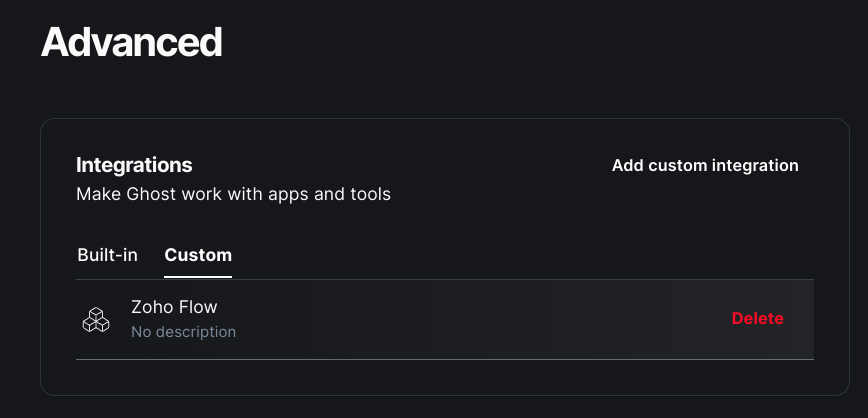
When you set up a custom integration, you're given the option to add events to it, and there's a wide list of them to choose from. I've selected post.published, post.published.edited, post.deleted, and post.unpublished. There's a catch-all called site.changed that you could just clear any time something changes, but I don't want to clear the cache when I schedule a post, just when something visible changes.
So, when any of those events occur a webhook is being sent over to my Zoho Flow workflow:
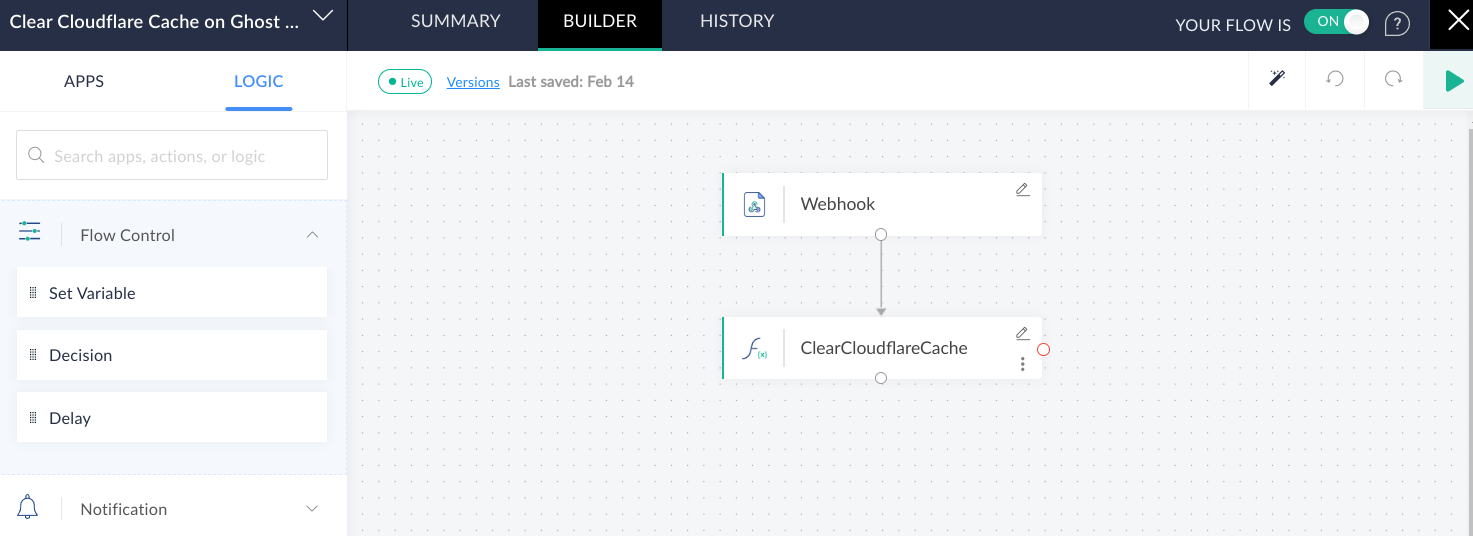
That ClearCloudflareCache function takes the post information from the webhook and clears two URLs: the homepage, and the published post URL by calling Cloudflare's purge_cache API.
Overall, the setup for that portion of the site was pretty straightforward.
post.published event!Ensuring logged-in users don't get cached
This one was slightly harder because you have to understand how Ghost identifies users. Likewise, I don't want to cache the /ghost interface because that's how everything gets done. So we need to set up some things in Cloudflare, namely have a cache rule that excludes a few paths and a cookie from the cache:
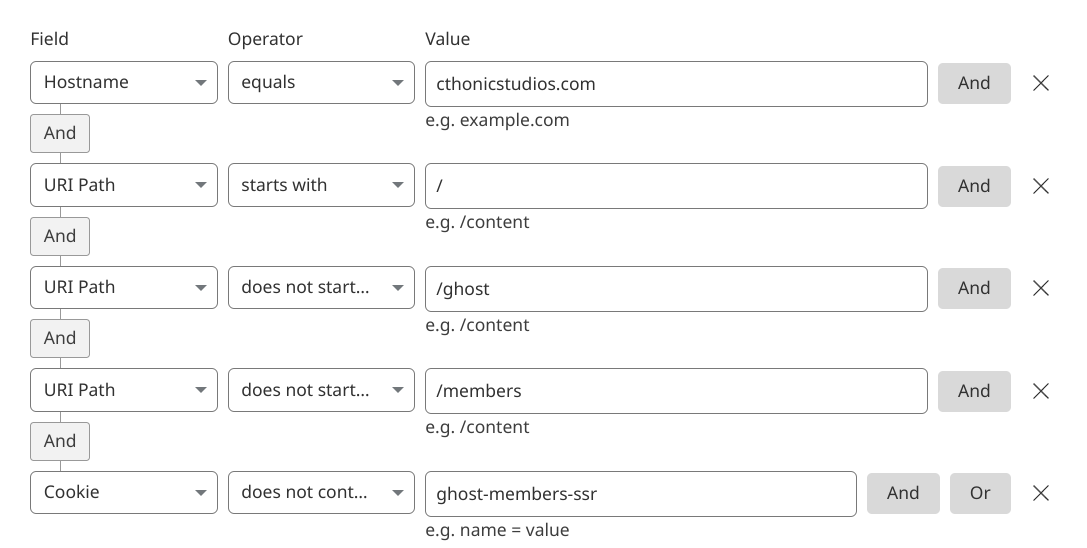
The most important two portions of this query are the exclusions on the /members paths and the ghost-members-ssr cookie. The former allows people to log in (because all authentication occurs on /members/* paths) and the latter ensures that once they're logged in, they're not served the cache. This is because Ghost stores the logged-in user's email address in that ghost-members-ssr cookie (and a hash signature in a different cookie so you can't tamper with it), so we're just bypassing the cache when that cookie is present.
Now, I could also include that cookie as part of the cache variance via a different contrivance if I wanted logged-in users to get cached content; but the overall authenticated traffic is so low I don't need to worry about that.
And with that, the site's able to handle a fair amount more traffic than it would sans caching.
Running the Cache infrastructure yourself
Now, you could do something like set up Varnish and put it in front of the HTTP server (or any other number of cache solutions), but that's another piece of infrastructure you're on the hook for. That said, it's also liable to be a lot cheaper. Here's a good blog post on doing just that if it's something that you want to do:
 Shounak Pal
A note on backups
Backing up Ghost is pretty simple when it's running in a docker container. The process is basically:
- Take a backup of the database (either via
mysqldumpor some other method like copying the physical files or xtrabackup or something). - Copy the images / uploads from the images volume.
- Zip both of those up somewhere and save it off-site.
Now there are some other options, you could do volume replication via Docker Swarm or the like… or you can farm the work off to a container someone else has written, like so:
 bennetimo
Finally, my theme is backed up on GitLab, as it's a slightly modified version of the official Casper theme.
Wrap Up
Hopefully this is a bit of a peek behind the curtain on how I've set up this Ghost site to handle traffic and stay up, and I hope it was useful for you all.